
What Is a Video CDN and How Does It Work? OTT Guide
Learn what a video CDN is, how it delivers live and on-demand streams, and what to check when viewers report slow starts, buffering, or delays during playback.


Table of contents
What is a Video CDN?
With a new episode going live, thousands of users will be requesting the first few seconds of your content. Without a Video CDN, your original server will be sending out the media file every time. By using a Video CDN, you can distribute this by having copies of your media on your distributed servers. This helps most if you have users in different regions or if you have a large spike in traffic due to a premiere.
Quick Answer
A Video CDN (Content Delivery Network) delivers video using a distributed network of servers. When a request is made by the player for a portion of video content, the edge server can deliver a cached version of the video. It may also request the content from upstream if necessary. This avoids duplicate requests to the origin which can improve startup times and reliability.
Where Does a CDN Fit in the Streaming Workflow?
This is the source of the media. This can be a packaged series stored in any cloud storage, or a live packaging service that produces new segments as the event happens. An edge server is the CDN server that handles requests; the player will typically request a manifest and media segments, rather than download the full video.
A CDN will only handle the delivery part of an OTT platform. The encoder will create playable versions, the CDN will deliver the requested files, and the player will decide what quality to request. The subscription/rights system will determine who can watch. This helps identify where the issue is. If the media has been encoded incorrectly or the subscription has expired there will be no gain in speeding up delivery.
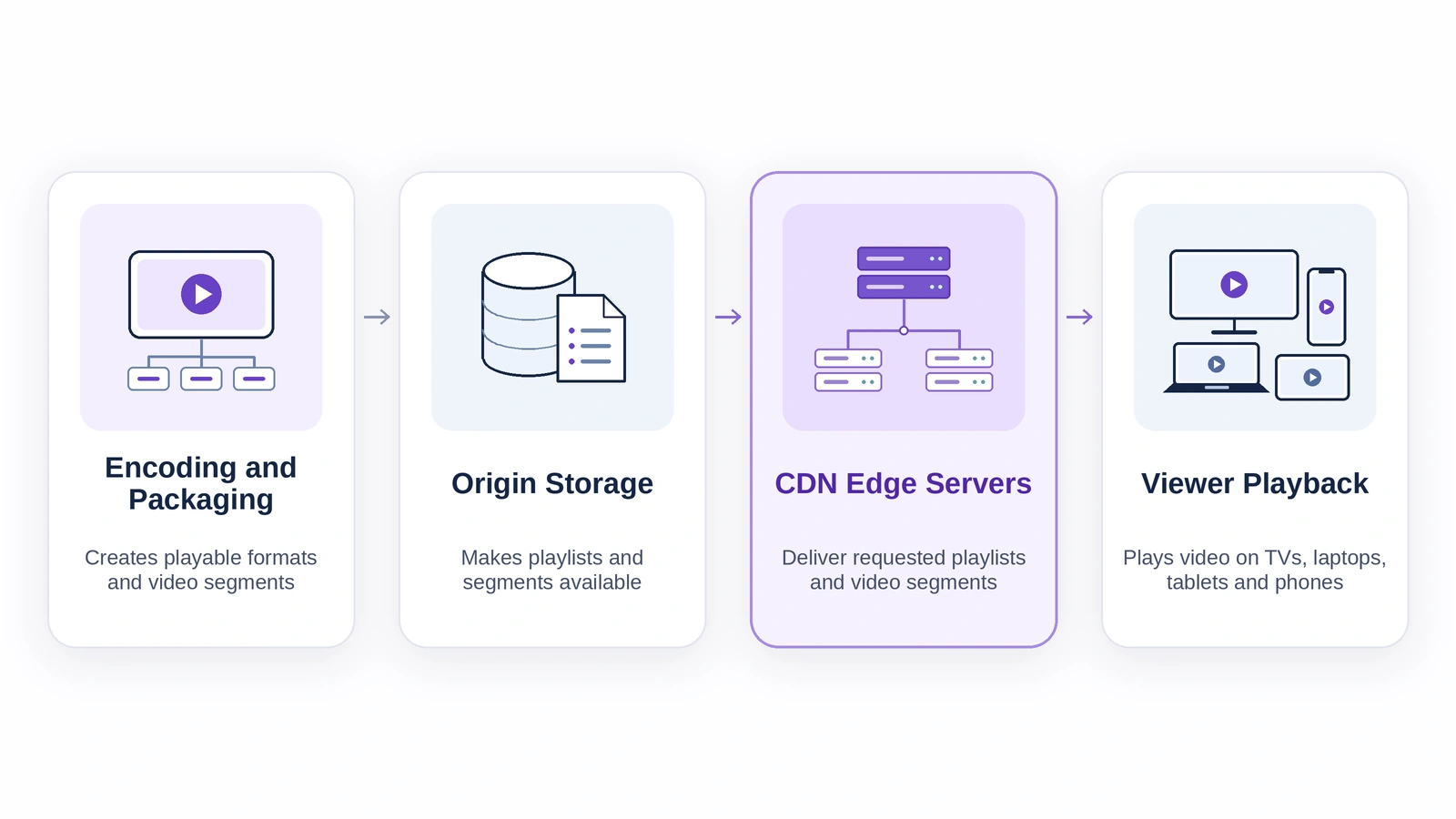
How Does a Video CDN Serve a Request?
- The player will ask for the playlist. This will tell it which variants are available or the next segments to request.
- The request will be sent to an edge, however this may take into account network factors. It may not be the closest server.
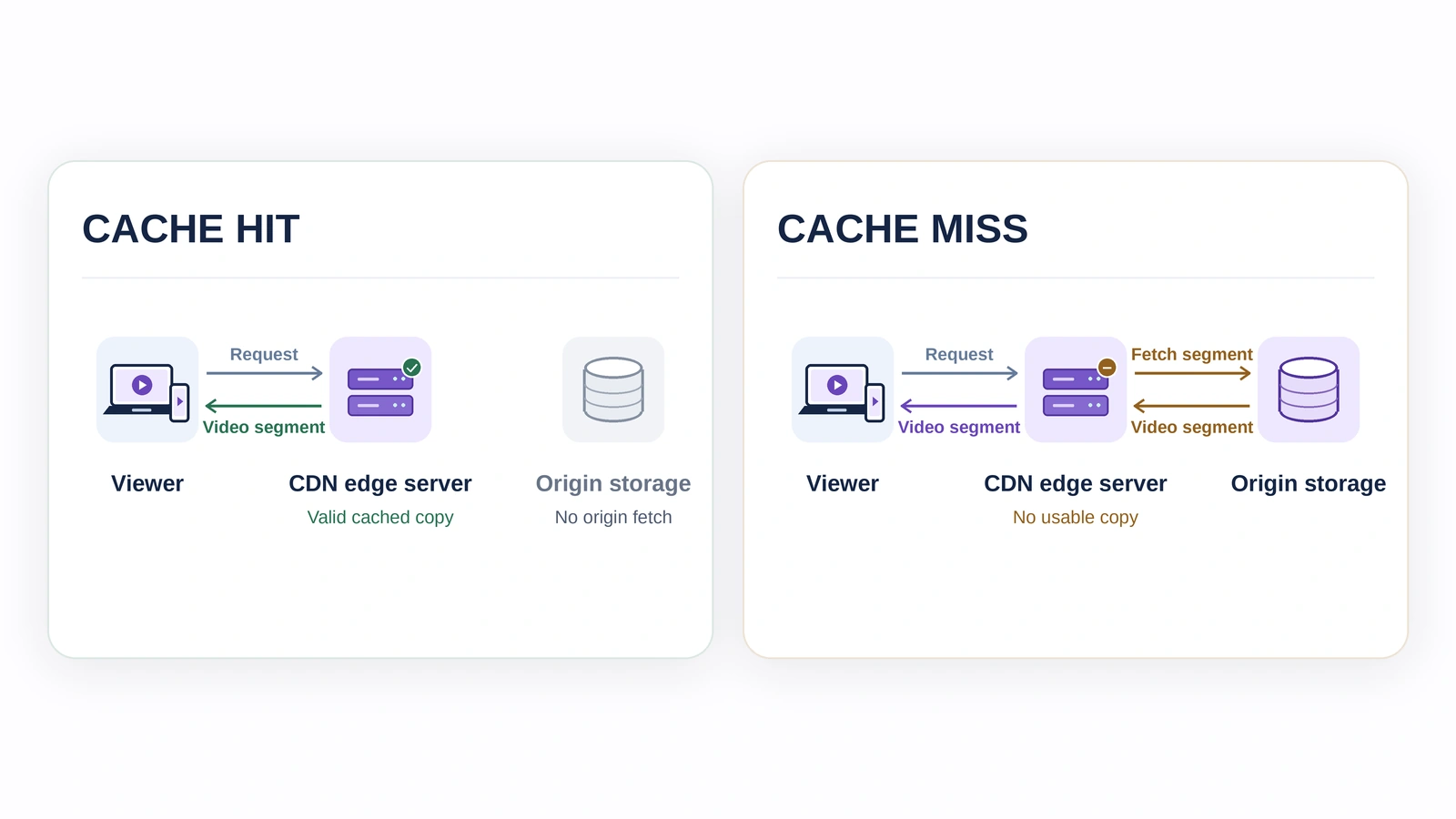
- If there is a usable copy of the requested file it will be provided immediately by the edge - cache hit.
- If there isn’t a usable copy (cache miss), the CDN will retrieve the file. This may pass through another CDN cache or go to the origin. Once a response is received, if it can be cached, the edge will store it for future requests.
Two users in the same region start watching an episode a minute apart. When the player requests the first segment of the episode, both will request the same segment at the same quality. The second request can be served from a cached version of the file. However, if the second user requests a different resolution, this will be a different file and may not be available on a different edge.
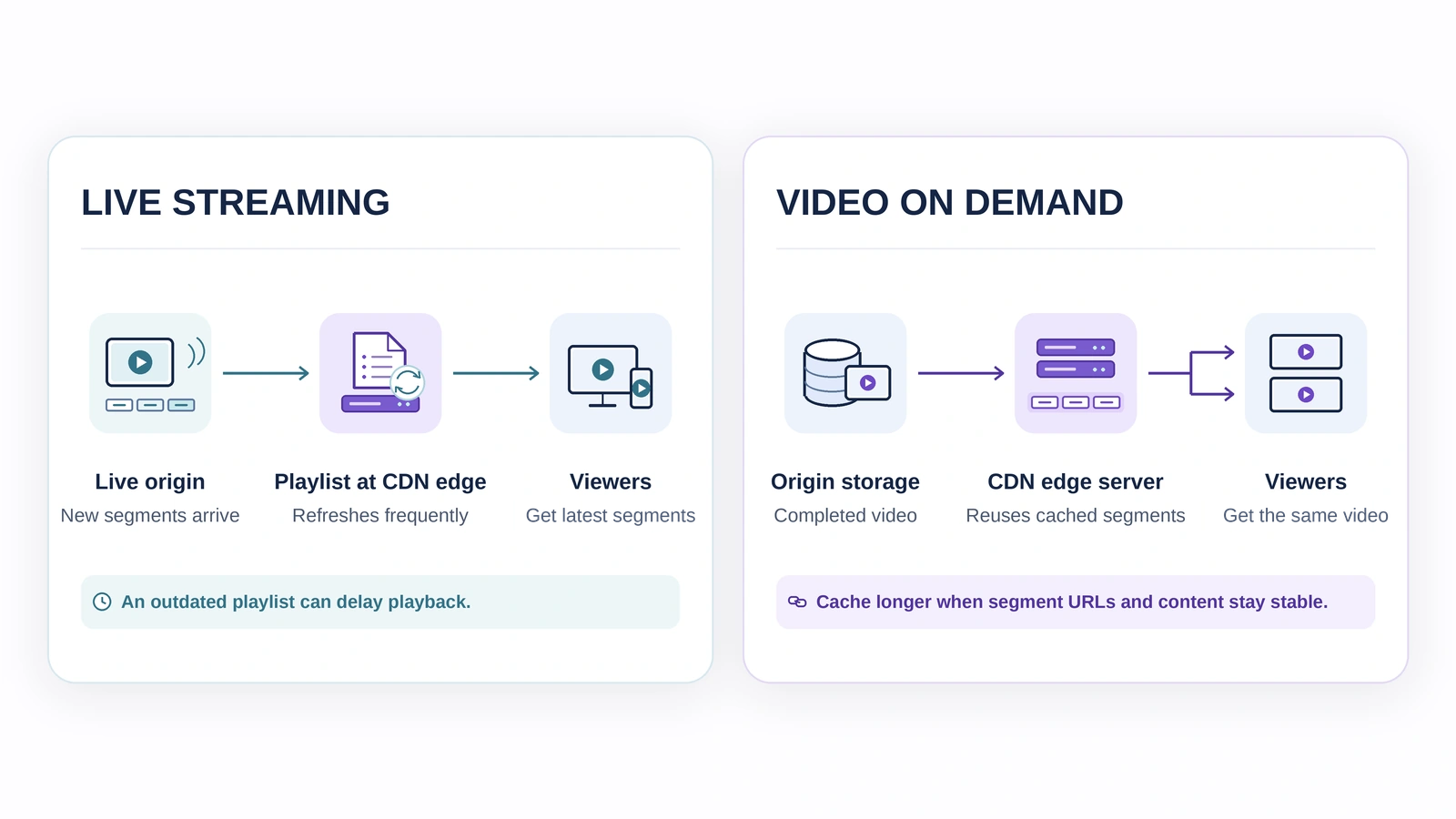
Why Do Live and On Demand Streams Need Different Cache Rules?
A live playlist changes as new segments appear. If the CDN serves an outdated copy for too long, the player may not see the latest segments and can fall behind the event. Completed media segments, by contrast, can often be reused for longer when their URLs are stable and their contents don’t change.
| What the player requests | Live streaming | Video on demand |
|---|---|---|
| Playlist | Refreshes as new media becomes available | Usually stays stable until the asset is updated |
| Video segments | Arrive continuously during the event | Prepared before viewers press Play |
| Common delivery issue | Stale playlists or a surge in simultaneous requests | Cache misses for rarely watched titles |
When comparing CDN infrastructure, ask whether playlists and media segments can have separate cache policies. Keeping a live playlist fresh does not mean every completed segment must be fetched from the origin on every request.
What Can Reduce a Video CDN’s Effectiveness?
The way a CDN caches the content depends heavily on its ability to identify requests that are the same. For example if you have a unique session parameter within your cache key then even if the segment is the same for every authorised user, each request will go into separate caches. To correct this the cache policy and access rules should be reviewed.
It is common to see some titles perform better than others when looking at large On Demand libraries. If a popular premiere has more cache hits than an old title that is rarely requested this should be taken into account. This can be done by looking at the performance of each title, each region and each file type. Sometimes using an average can hide performance issues in certain regions or problems with your live playlists.
What Should Operators Check When Playback Slows?
Start by identifying the key issues within one session. You will want to take note of the title, region, device, time stamp and error. Based on the issues you are having you can investigate further.
- Slow to start in one region. Investigate playback timing and first segment latency. Are there more requests going to the origin?
- Playback is lagging in life. Compare the playlist at the edge with the latest playlist at the origin. If they are both up to date then check the live buffer configurations on the player.
- Issues with specific device type. Before making any changes to the CDN check what codecs are supported and if there are any errors coming from the player.
- Many people stuck on the same time stamp. Try requesting the affected segment. Ensure it is available and can be played.
Keep an eye on the start up times, rebuffering, cache hit ratio and origin traffic. A good cache hit ratio can help however does not assure that the viewer won’t have any interruptions.
Final Thoughts
A Video CDN can reduce the load on your origin whilst delivering the same media to each user. To ensure you’re getting the most out of your CDN we recommend setting up different caching rules for your live playlists and reusable media segments. We also suggest testing with both a high volume title and a low volume title in your regions. This will help identify if you need to optimise your caching settings, look into your origin or somewhere else within your delivery chain based on what is being reported in your CDN versus how fast your users are playing back, stalling and how much they’re falling behind in live video.
For more on video delivery and OTT operations, explore streaming technology updates on LinkedIn.
Planning to launch or modernize an OTT platform?
StreamPlay helps media companies, sports leagues, and broadcasters launch branded OTT aggregator apps with CMS, monetization, discovery, and multi-device support.
Frequently Asked Questions
Is a Video CDN the same thing as video hosting?
No. Video hosting will store your video or make it available to play on the origin. Whereas a Video CDN will serve your video to your viewers.
Can a Video CDN support live streaming?
Yes. It can support dynamic playlists and new media segments.
What is a cache miss?
When your edge server does not have a valid copy of a file to serve. It has to go upstream to get it.
Will using a CDN help with buffering issues?
No. Poor connectivity, device performance issues and video issues can cause buffering.
Will using a CDN affect the quality of my video?
No. The player will choose what quality to play. The CDN will serve the correct segments.
Will a Video CDN replace DRM?
No. The media will be served by the CDN however the Digital Rights Management will manage protected media.