
How Video Streaming Technology Works: From File to Screen
Learn how video streaming technology works, from encoding and delivery to adaptive playback, and see what causes buffering, quality drops, and live delays.


Table of contents
How Video Streaming Technology Works
The video looks high quality when you're watching it on Wi Fi but then becomes more pixelated when you switch over to your mobile data. The video will still play but won't look as good. This is often due to the video player requesting a lower resolution video clip of the next few seconds rather than waiting for a higher resolution clip (which may cause a lag).
This is a good place to start to understand how the technology works. Most of the time you're watching short clips that are played in succession to create one continuous video.
Quick Answer
Video is streamed by breaking the audio and video into small chunks. As the player plays the chunks they are downloaded. Multiple versions of different qualities are prepared. The delivery network provides the correct chunk and the player automatically switches between them to ensure continuous playback.
What Happens When You Press Play?
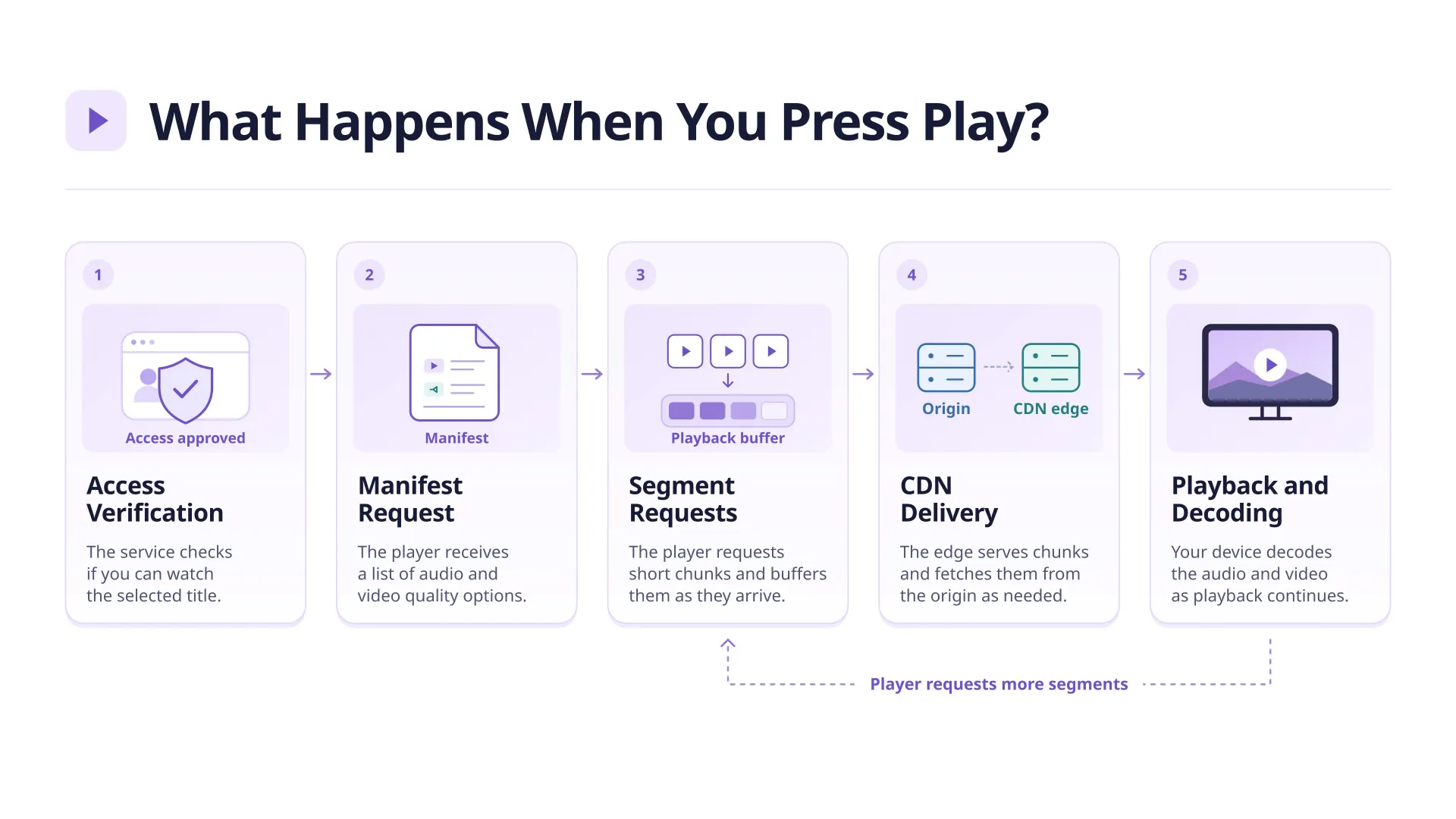
The player needs to know what streams are available and how to request them. For subscription based OTT platforms the service will first confirm that you have access to the title.
- A manifest file (think map) with information about the streams that are available at different quality levels is used. HLS refer to this as playlists.
- Some initial segments of media are requested. These are small pieces of media. A little media will be held in a buffer.
- The media will be delivered using the delivery network. This could be using a CDN. The media could have been delivered from cached media on an edge server. If the media wasn’t cached then it can be fetched from the origin.
- The media will be decoded by your device and played back. Whilst the video is playing more segments will be requested. If someone fast forwards through a pre recorded episode then media can be requested from around that point.
How Is Video Prepared for Streaming?
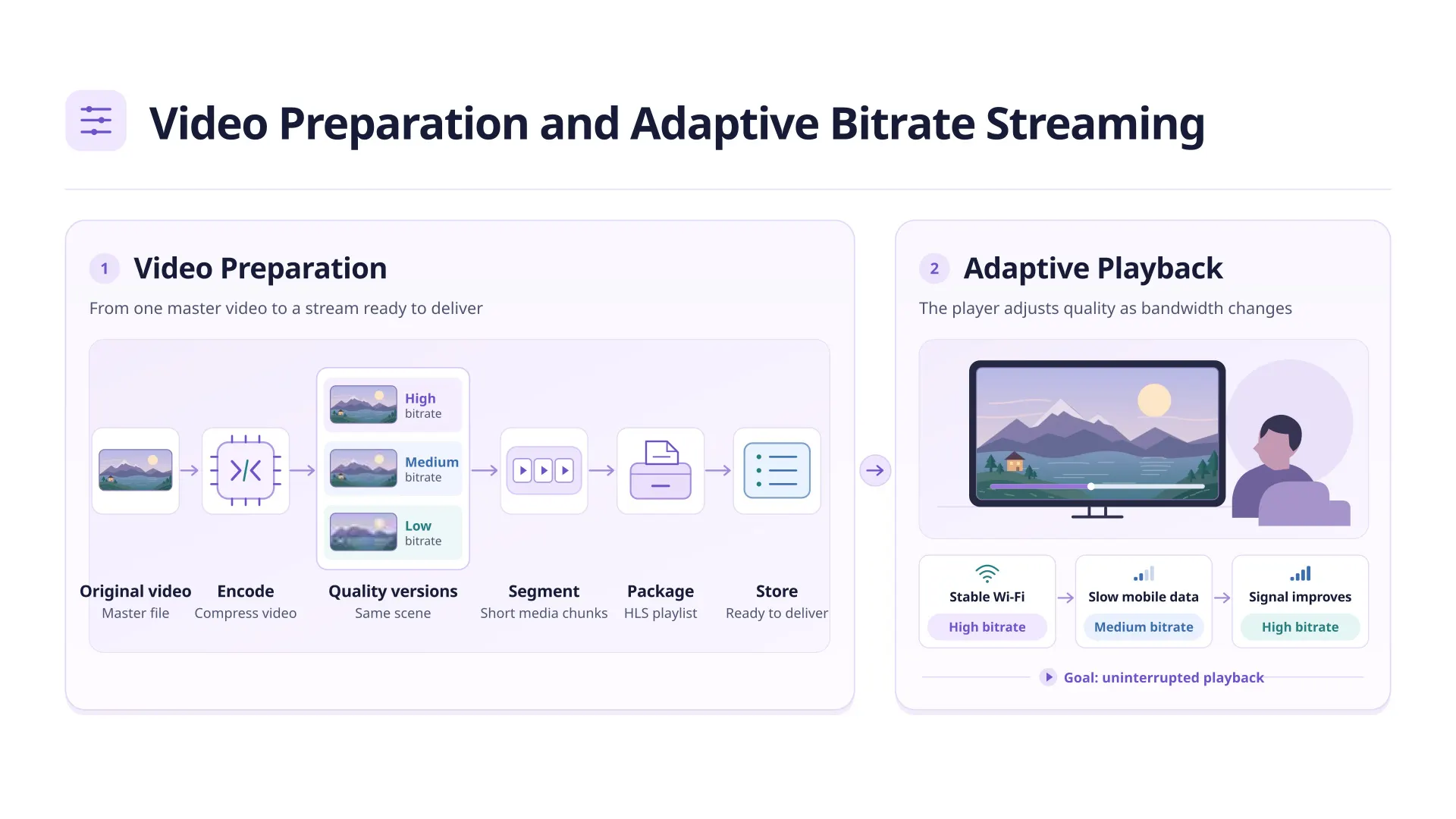
It may well be that your production file is not ready to play back onto any screen. The service will usually convert your file into different bit rates. Bit rate means how much data is used per second and the resolution means how large your image is. They may have a similar resolution but different bit rates meaning they will look different when there is quick movement.
These are then grouped together in segments and the manifests created. Encoding refers to how your video and audio are compressed whilst packaging refers to how the player will find and play your video. It is important to know the difference between encoding and packaging as your video could be correctly encoded but still not work due to an incorrect manifest.
Why Does Picture Quality Change Midstream?
Adaptive streaming gives the player the ability to request different versions of content based on real time information. Such as how quickly the last few segments were downloaded, how much video is playable and what the device can handle.
If the viewer moves between Wi Fi and mobile data and the next segment takes longer to download then the player will request a lower bitrate version. Once the connection returns to full speed, it will return to a higher quality version. This can cause a small dip in quality but should still be functioning as expected. If there are frequent changes in quality on a stable connection then it might be worth looking into.
Why Is a Live Stream Behind the Action?
In live scenarios, encoders and packagers will need to process the media in real time. This means that the player will not be able to receive sufficient media to play back. This results in latency. If smaller chunks of media are used then you can reduce the latency. However, if there is less media held by the player then it can’t compensate as much from any network issues.
In on demand scenarios media is usually pre recorded. The viewer will also be able to fast forward, rewind etc. through the finished episode. Audio tracks and captions can be checked before it is published. This means we are more concerned about how quickly it can be played along with a smooth playback.
What Do Common Playback Problems Tell You?
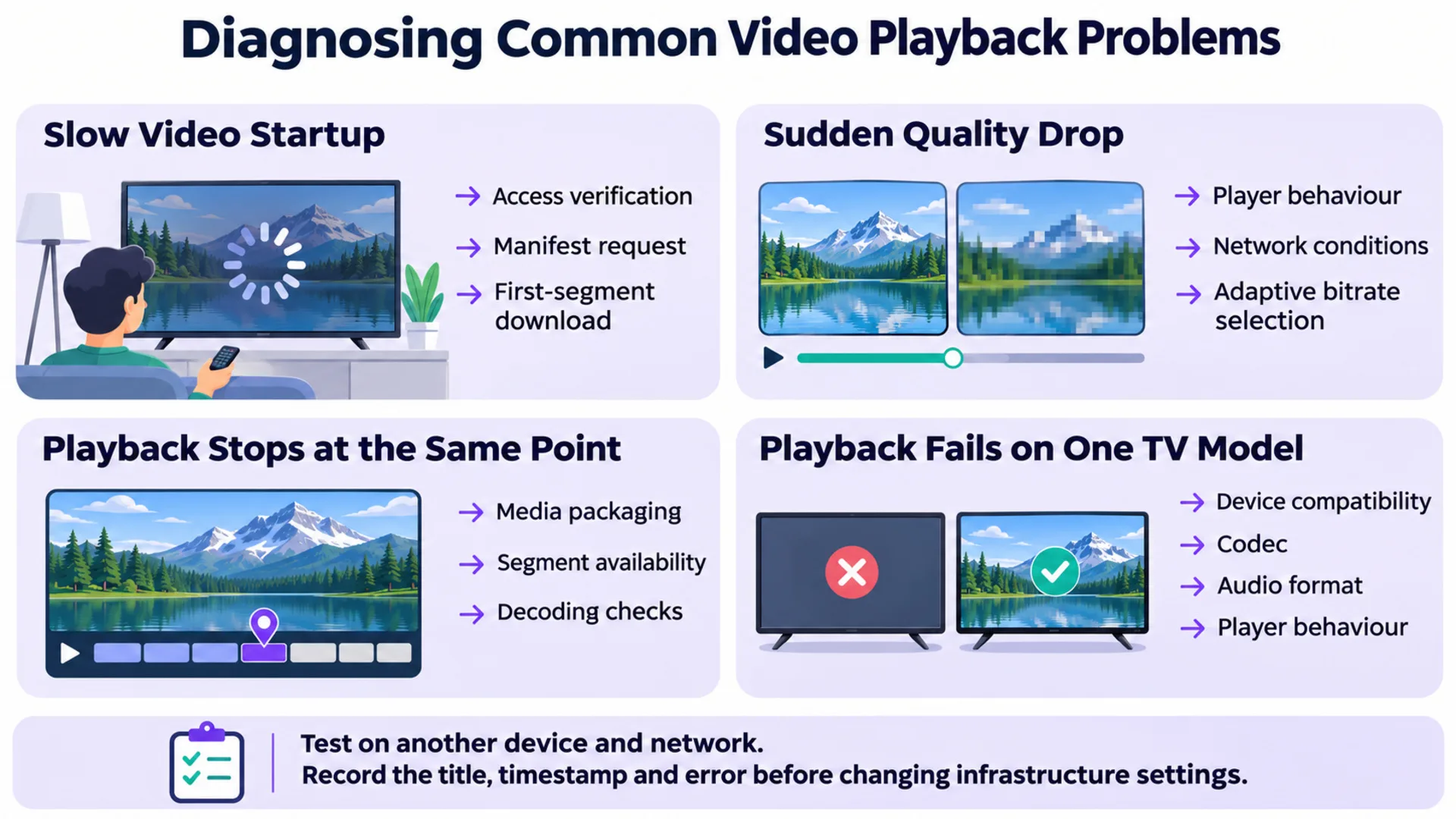
| What viewers notice | Where to look first | What to check |
|---|---|---|
| A long wait before the video starts | Startup requests | Separate account checks from manifest and first segment download times. |
| A brief drop in picture quality | Player and network | See whether quality recovers without a pause. |
| Playback stops at the same point for many viewers | Media or packaging | Check whether the segment at that timestamp loads and decodes. |
| Playback fails on one TV model | Device compatibility | Compare the codec, audio format, and player behavior with a working device. |
Before changing encoding settings or blaming the CDN, reproduce the issue on a second device or network. Record the title, timestamp, and error. A problem tied to one scene suggests a different investigation from a problem affecting every title on one device.
Final Thoughts
You can think of video streaming as a chain of steps. After encoding, players need to be told where the playable videos are by packaging. They will then be sent from the CDN and dynamically adapted. By looking at these steps, you can begin testing your streaming service. Instead of assuming everything is a bandwidth issue, you will know if it is an issue with 1 title, 1 device or lots of people watching.
For more on internet video delivery, explore streaming technology updates on LinkedIn.
Planning to launch or modernize an OTT platform?
StreamPlay helps media companies, sports leagues, and broadcasters launch branded OTT aggregator apps with CMS, monetization, discovery, and multi-device support.
Frequently Asked Questions
Streaming vs Downloading?
No. Streaming will play the media as you watch it. Whereas downloading will usually save the media for later.
Codec vs HLS?
A Codec will compress the media and decode it. HLS groups the media into playlists and segments for streaming via the internet.
Will having a better internet connection make my streaming quality better?
Not necessarily. The quality will depend on the video source, available versions and capability of decoding.
Why does my video start out blurry?
The player will often start at a low bitrate version so it can play faster. Once measuring the speed of your connection it will increase the quality.
What is the difference between buffering and latency?
Buffering will cause the media to pause whilst waiting for more data. Latency is how long it takes for live media to show up on the screen.
Are subtitles required for the video?
No. They can be sent as a separate track so the viewer can choose their preferred language or even turn them off.