How Does OTT Streaming Work? Step by Step Guide 2026
Learn how OTT streaming works step by step, from video encoding and CDN delivery to adaptive playback, content security, and live streaming technology.


Table of contents
How Does OTT Streaming Work? Step by Step Guide
When you hit play on any streaming apps you will typically get a video playing within seconds. This is possible because of many different technologies.
Learning how OTT streaming works can help your business make the right decisions regarding your streaming infrastructure, identify any problems with your videos being played back and choose the right technology for your service.
The following steps will show you every part of the process from ingesting, encoding, content delivery networks, adaptive playback and viewing.
Quick Answer
Over The Top (OTT) streaming is the distribution of video content directly over the internet, without using traditional cable/satellite infrastructure. Video content can be uploaded/captured, encoded, broken down and distributed via Content Delivery Networks. Streaming applications will download these content pieces and allow them to be played back, with different quality levels based on the network connection.
What Is OTT Streaming and How Does It Work?
Over The Top (OTT) refers to online video and media that does not require you to have a TV Cable / Satellite Subscription.
This content is available to view on compatible Smartphones, Smart TVs, Computers and Streaming Devices.
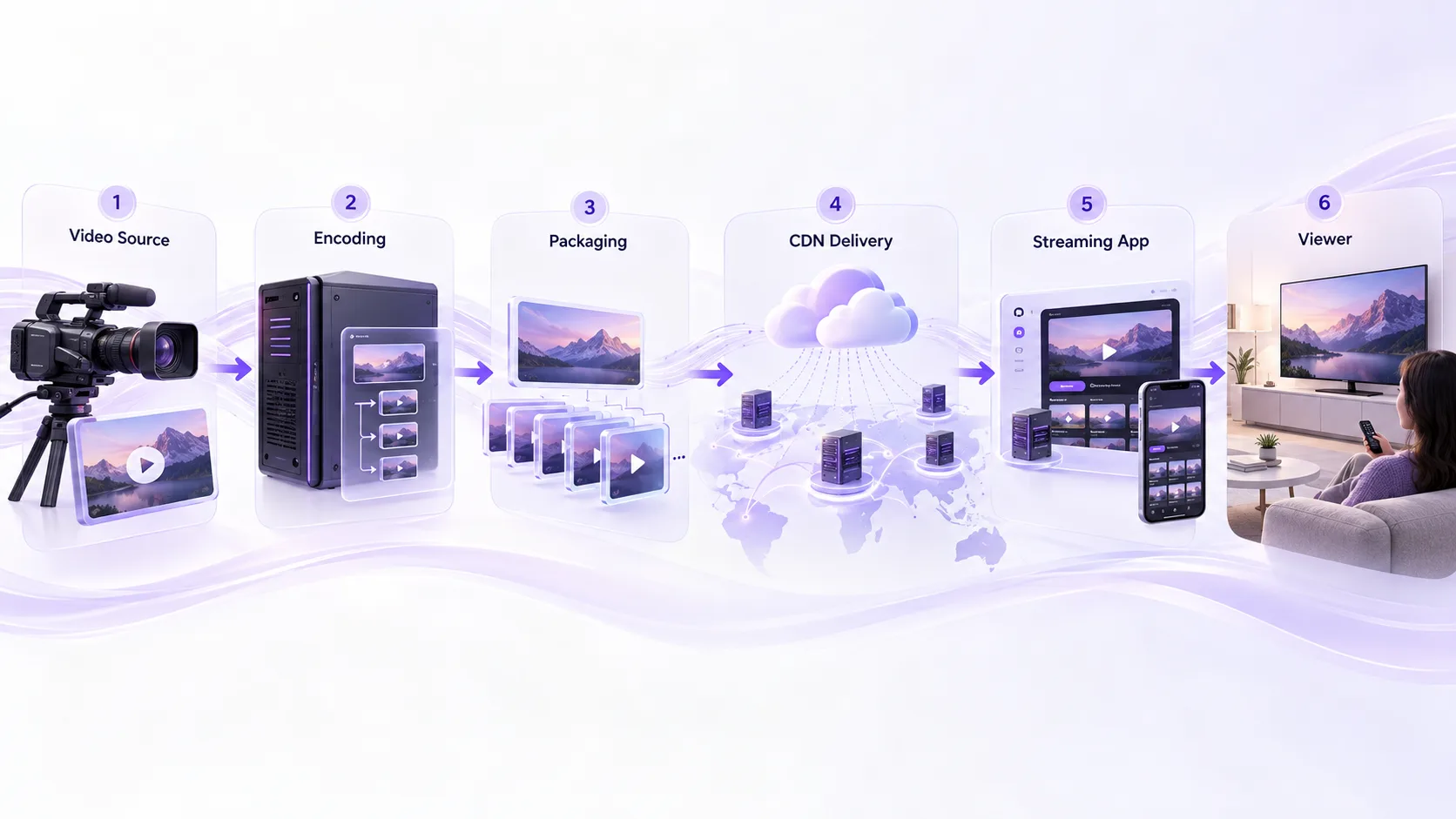
The content will need to go through the following process to stream:
Video Source > Encode > Package > CDN > Streaming App > Viewer
Whilst each part of this process has individual functions, they work together to allow smooth video playback.
A White Label OTT Platform provides an easy way for Content Providers to place these technical elements in a controlled environment to deliver branded content.
How Does OTT Streaming Work Step by Step?
Step 1: Video Content Is Uploaded or Captured
The process begins with a video source.For video on demand (VOD), the source is usually a prerecorded file uploaded to a content management system.
For live streaming, the source comes from cameras or production equipment capturing an ongoing event.
Common video sources include:
- Movies and television episodes
- Live sporting events
- Educational recordings
- News broadcasts and interviews
The original content must be prepared before it can be delivered efficiently across different devices and internet connections.
Step 2: Video Encoding Converts the Source Into Streaming Formats
Raw video files may be too large or not ideal for sending across the internet efficiently.
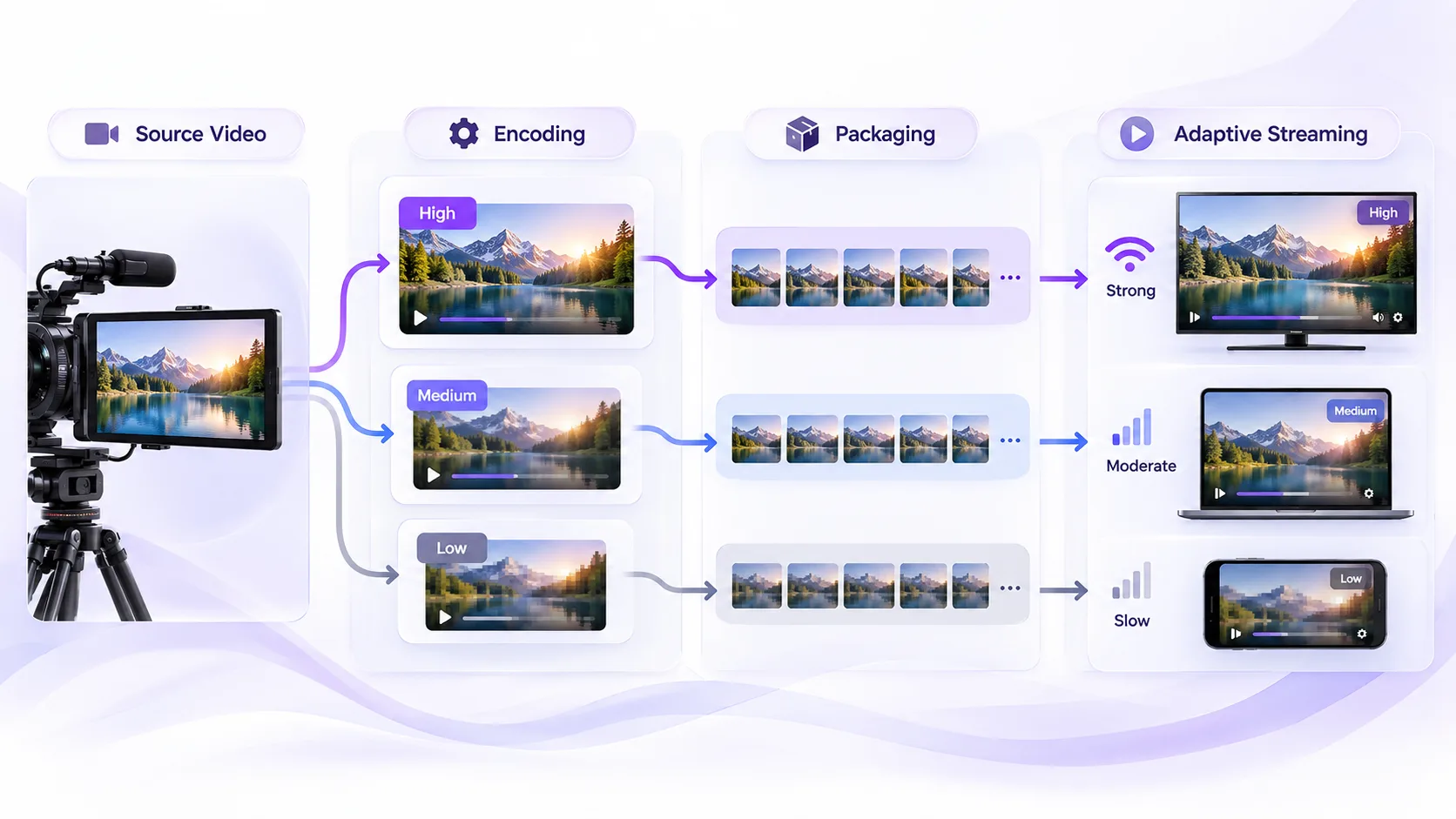
Encoding will take the video and convert it into a playable digital format. To give you more options we can transcode to give different resolutions, bit rates or formats.
An example of this could be to create multiple versions of your video at differing quality levels,
- 1080p for Higher bandwidth connections
- 720p for Medium connections
- 480p for Slower connections
This means that your video player will be able to select the correct version of the video depending on your connection speed.
Depending on your source video, encoding settings and platform requirements you can have varying resolutions available.
Step 3: Video Packaging Creates Small Segments
After your video is created, you need to be able to deliver it effectively.
A content delivery network (CDN) is a network of distributed servers that can cache and deliver your video.
If you're based in India, then you can access cached segments of your video which are closer to you.
This helps to:
- Minimise unnecessary network traffic.
- Support high volumes of users.
- Increase content availability.
- Reduce the strain on the origin infrastructure.
The actual delivery of the streaming will depend on several factors such as network conditions, infrastructure set up and user popularity.
Step 4: A Content Delivery Network Distributes the Video
After your video is created, you need to be able to deliver it effectively.
A content delivery network (CDN) is a network of distributed servers that can cache and deliver your video.
If you're based in India, then you can access cached segments of your video which are closer to you.
This helps to:
- Minimise unnecessary network traffic.
- Support high volumes of users.
- Increase content availability.
- Reduce the strain on the origin infrastructure.
The actual delivery of the streaming will depend on several factors such as network conditions, infrastructure set up and user popularity.
Step 5: The Streaming Platform Verifies Viewer Access
User authentication
Can be done by:
- Verifying the user.
- Checking that they have a valid subscription or purchase.
- Checking that the content is available in their region.
- Allowing them access to the stream.
- Some licensed content may also require DRM's.
When choosing an OTT platform it is a good idea to understand how authentication, subscriptions, licensing and playback have been designed.
If not set up correctly legitimate subscribers will not be able to see the content they have purchased.
Step 6: The Video Player Starts Playback
Once access is allowed the streaming app will request the manifest and video segments.
The player will download some data which allows them to start playing the video, and will continue to request segments as they play.
Adaptive Bitrate Streaming (ABR) means the video quality will adapt to your available bandwidth and how you are playing it.
For example, if your internet connection becomes unstable, the player may move to a lower bitrate video.
This can help reduce buffering but if there are significant issues with the connection, there will still be interruptions.
Step 7: Analytics Monitor the Viewing Experience
Streaming Analytics can be used to understand how well the video is playing, how engaged your audience are and any issues that may be happening.
Key metrics include:
- How fast it takes for the video to start playing
- How often the video buffers
- How many times there are issues playing the video
- Completion rate
- Performance of devices and networks
This can help operators to spot any issues and enhance the viewing experience.
How Is Live OTT Streaming Different From Video on Demand?
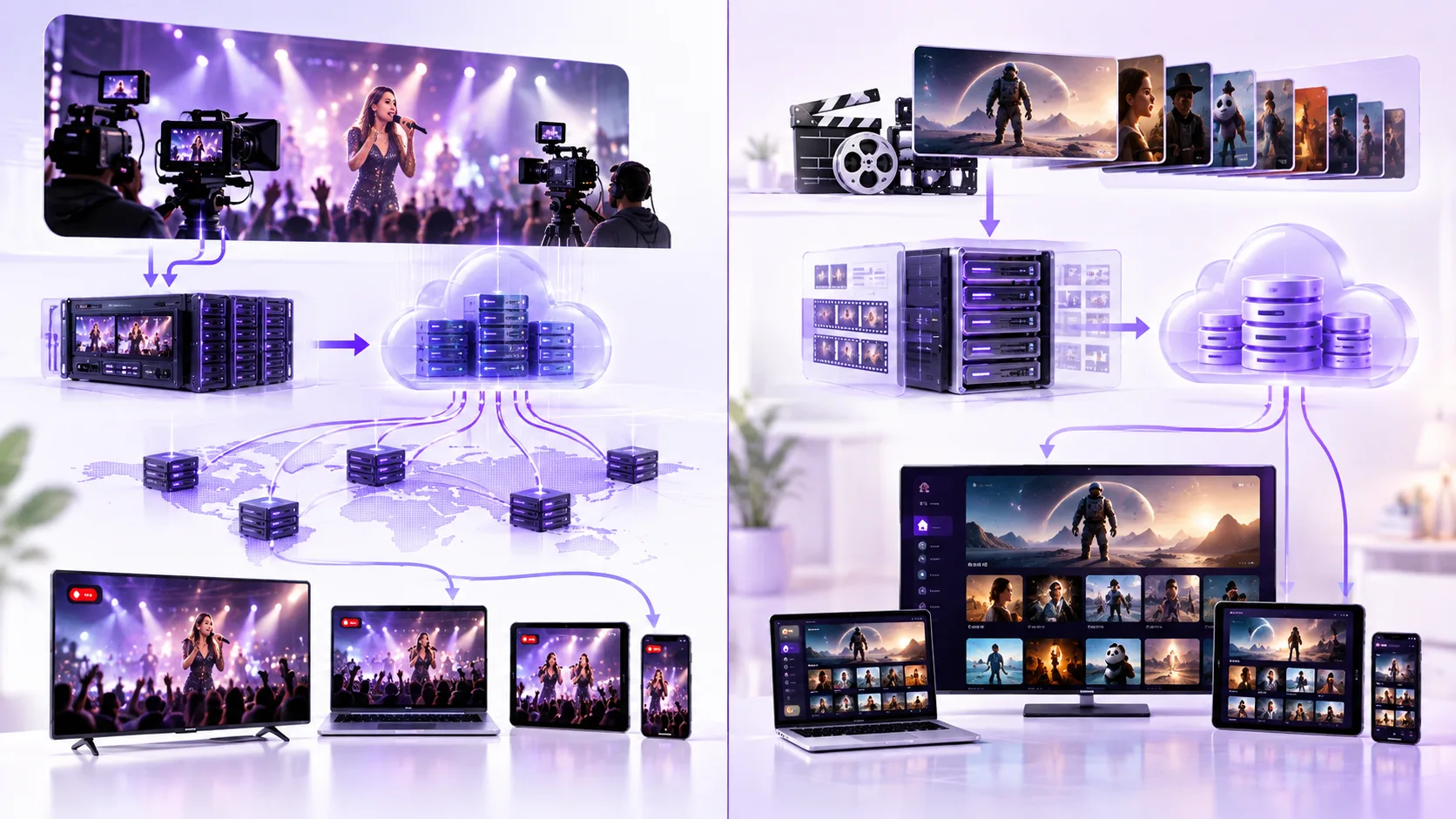
Live streaming and on-demand streaming use similar delivery technologies, but their processing requirements differ.
| Factor | Live OTT streaming | Video on demand |
|---|---|---|
| Video source | Ongoing live feed | Prerecorded file |
| Processing | Continuous encoding | Usually prepared before publishing |
| Availability | During an active broadcast | Accessible whenever permitted |
| Latency | Important for real-time viewing | Generally less critical |
| Main challenge | Keeping delivery timely and stable | Maintaining reliable content access |
For example, a live football match requires continuous processing and delivery as the event happens.
A prerecorded documentary can be processed before publication and stored for repeated viewing.
A dedicated video-on-demand solution can support organized content libraries, episodic programming, and playback across supported devices.
Why Do OTT Streaming Videos Sometimes Buffer?
Buffering is caused by the player not being able to get enough video data in time.
This can be caused by multiple reasons, including:
- Low bandwidth: Not having enough bandwidth to consistently play the chosen video quality.
- Congested CDN: Too much traffic on the CDN.
- Encoding issues: Video chunks not being properly encoded.
- Device issues: Device unable to decode the chosen format.
- Playback issues: Players not playing the quality change or buffering efficiently.
Operators should look into any issues with load times, buffering and playback issues on various devices and networks.
Improving one part of the technology will not necessarily improve other parts.
What Should Businesses Check Before Choosing OTT Streaming Technology?
Understanding how videos are going to be streamed will help you find the best platform.
Make sure you have:
- Correct video formats for encoding videos. Videos will be encoded properly for the required device.
- A reliable delivery mechanism. Include CDN and adaptive bitrate.
- Secure content. Use a secure platform with features such as authentication to ensure only authorised viewing. There should also be DRM if required.
- Correct features for live/on demand content.
- Analytics so you can see if there are any issues when playing or delivering the content.
An end to end solution. You should have everything from authentication, selection of the content, playback and handling of network issues.
Final Thoughts
An OTT streaming system contains various components.
Before a stream can be delivered, it must be encoded and packaged and passed through a CDN. The player will adapt the stream based on what is available at that time.
This can help a business know which technologies are involved, any technology limitations and deliver a reliable streaming service.
For more information about OTT technology and video delivery, explore streaming technology insights on LinkedIn.
Planning to launch or modernize an OTT platform?
StreamPlay helps media companies, sports leagues, and broadcasters launch branded OTT aggregator apps with CMS, monetization, discovery, and multi-device support.
Frequently Asked Questions
What is OTT Streaming?
Streaming Over The Top (OTT) is streaming video content via the internet.
How are videos streamed via OTT?
OTT platforms compress the videos, break them down into sections and stream them using internet enabled servers and streaming software.
What is a CDN?
CDN stands for Content Delivery Network. It uses a network of servers to enable efficient streaming of video content to viewers.
What is adaptive bitrate?
Adaptive bit rate automatically changes the video quality depending on the network connection to help avoid buffering.
What is the difference between OTT and IPTV?
OTT usually streams videos over a public internet whereas IPTV generally uses a managed television network.
Can OTT platforms provide live streaming?
Yes. OTT platforms can be used to provide live streaming of sports, news, concerts etc. via the internet.